
What are self-referencing links?
First of all, let’s define what I mean when I’m talking about “self-referencing link”.
Self-referencing links are links that lead to the same page where you find them: let’s think about them in terms of anchor tags <a href="..."></a> in which the href attribute is equal to the current page path.
They can create a confusing user experience.\
This type of link is generally found in navigation menus, footers, or other repeated elements across a website, but can be found anywhere really.
An example of a self-referencing link would be an anchor tag in your “about me” page that links to the same “about me” page.
Here’s a real world example with a navigation menu: you probably have a reusable navigation component in your website, which is used in multiple pages, that looks something like this:
<nav>
  <ul>
    <li><a href="/">Home</a></li>
    <li><a href="/about-me">About Me</a></li>
    <li><a href="/blog">Blog</a></li>
  </ul>
</nav>
When you are on the about me page, its final html would probably be:
<!-- url: example.com/about-me -->

<body>
  <!-- More content -->
  <nav>
    <ul>
      <li><a href="/">Home</a></li>
      <li><a href="/about-me">About me</a></li> <!-- This is a self-referencing link -->
      <li><a href="/blog">Blog</a></li>
    </ul>
  </nav>
  <!-- More content -->
  <h1>About Me</h1>
  <!-- More content -->
</body>
As you can see, the “About me” link points to the same page where it is located, creating a self-referencing link: we want to avoid having this kind of links in our website.
In this post, I will share why I decided to avoid using them in my website’s navigation structure, how I achieved this and why you should consider doing the same.
But wait, why should we avoid self-referencing links?
Ask yourself this question: what do you think users expect to happen when they click on a link?
Exactly, to not be brought to a malicious website to be taken to a different page, right?
Some users might get confused when interacting with them, not understanding why they are being directed back to the same page they are already on.
Both from a common UX point of view and, especially, an accessibility point of view, self-referencing links can create a frustrating experience for many users.
This is particularly true for users who rely on assistive technologies, such as screen readers, which may announce the link but not provide any additional context about its purpose.
What have I used instead?
In my website, I have decided to avoid self-referencing links by removing them from the navigation structure.
Instead of having an anchor tag that points to the current page, I have replaced it with a <span> element that visually looks like a link (but without the pointer commonly found when hovering on an anchor tag) with a colored underline to visually indicate that it is a reference to the current page.
Here’s how my navigation menu looks like, on desktop and on mobile, with self-referencing links replaced by styled <span> elements:

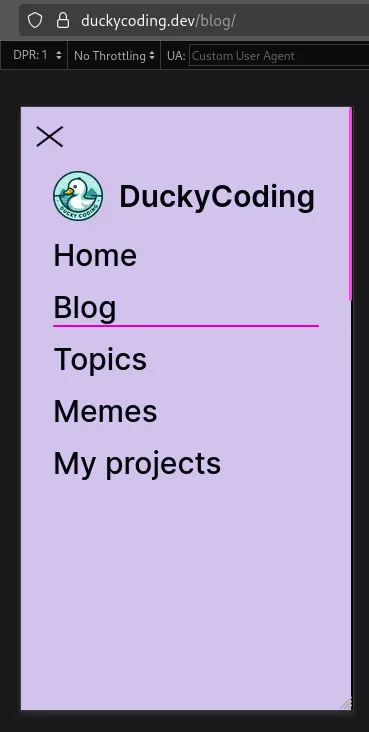
Notice the underline style applied to the <span> element, which visually indicates which “link” is the current page, while still not being a clickable link.\
Replacing the <a> tag with a <span> automatically prevents:
- the link from being clickable
- the link from being announced by screen readers as a link
- the link from being tabbable, which is important for keyboard navigation
And finally, on top of this, I have also added an aria-current="page" attribute to the <span> element to indicate that it is the current page, which is useful for screen readers and other assistive technologies.
How I achieved this easily
Being my website statically generated with Astro at build time, I have create a custom <Link /> that automatically detects if the href prop is equal to the current page path and, in that case, renders a <span> element instead of an <a> element.\
Here is a simplified version of the code I used to achieve this:
---
interface Props extends HTMLAttributes<'a'> {}

const {
  class: className
  href,
  isActive = false,
  ...props
}: Props = Astro.props;

const currentPath = Astro.url.pathname;
const pathWithoutSlash = currentPath.endsWith('/')
  ? currentPath.slice(0, -1)
  : currentPath;
const hrefWithoutSlash = href?.toString()?.endsWith('/')
  ? href?.toString().slice(0, -1)
  : href?.toString();
---

{
  href && pathWithoutSlash !== hrefWithoutSlash && !isActive ? (
    <a
      class={`link-style ${className ? className : ''}`}
      href={href}
      {...props}
    >
      <slot />
    </a>
  ) : (
    <span
      class={`link-style underlined ${className ? className : ''}`}
      aria-current='page'
      {...props}
    >
      <slot />
    </span>
  )
}
As you can see, I am checking if the href prop is equal to the current page path and, in that case, I render a <span> element instead of an <a> element.
I’m comparing the current path and the href and currentPath by removing the trailing slash first if present, since my pages can either include it or not.
And also, I can provide an isActive prop to manually trigger the rendering of a <span> element instead of an <a> element if needed in other scenarios.
The logic is very simple, and does not impact the performance of my website in any way, since it is only executed at build time and does not require any additional JavaScript to run on the client.
Replicating this logic in a different framework/library or even on code that runs on the client side (such as in a React SPA) should be pretty straightforward, as the logic is quite simple and does not require any specific framework features.
Wrapping up
Avoiding self-referencing links in your website’s navigation structure can greatly enhance the user experience, especially for users relying on assistive technologies.
It does not require much effort to implement, and can be done easily with a custom <Link /> component that detects when the href prop is equal to the current page path.
I highly recommend you to consider this approach in your next project, as it can make a big difference in terms of accessibility and user experience… or don’t, it’s up to you! 😄
Greetings
I hope you enjoyed this article and got to learn something new about web development and accessibility! If you have any questions or suggestions, feel free to reach me out on my socials.
Also, if you found this post helpful, please consider sharing it with your friends and colleagues!\
Until next time, happy coding! Quack! 🦆